Update (2026-11): multi-board products shipped in WireFrame 2.0.1; the current release is 2.0.4.
The bug that costs a respin is often not on any board. It is between them: the cape's 3.3 V on a pin the host calls 5 V, SDA wired to SCL across a connector, a ribbon cable turned round, an ultrasonic sensor whose 5 V ECHO lands on a 3.3 V GPIO. Each board's ERC and DRC are clean — they cannot see the other board.
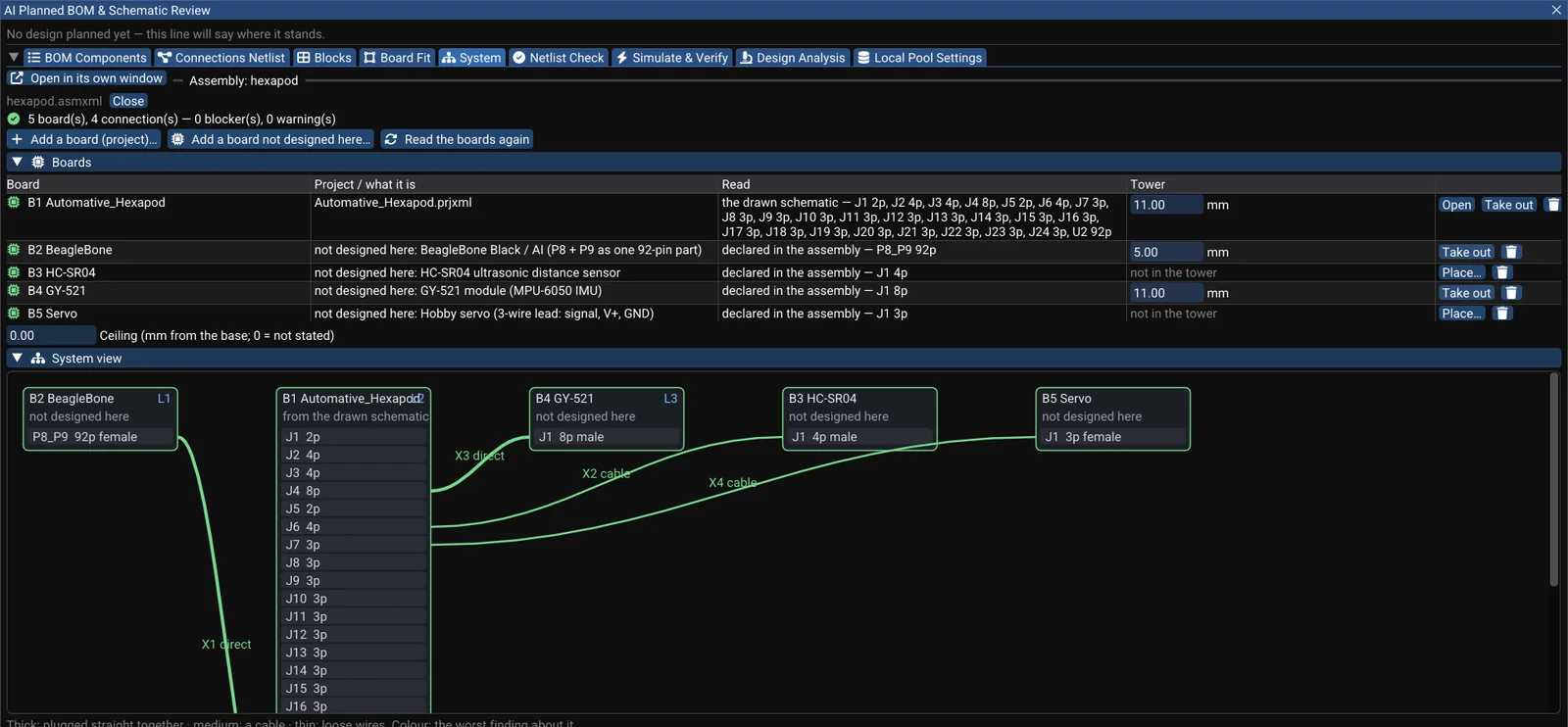
WireFrame (in the beta of the next release) treats a product of several boards as one project: a PCB per board, each drawn from its own root sheet, a board stack for the tower, and one assembly file (.asmxml) that names every board and every connection — and checks them pin by pin.
A real product: a hexapod's BeagleBone AI cape#
The autonomous hexapod robot is open hardware (GPL-2.0): a cape that plugs onto a BeagleBone AI, with an HC-SR04 ultrasonic sensor on a cable, a GY-521 IMU module plugged straight in, and hobby servos on leads. Only the cape is designed in a PCB tool. The others are bought.
WireFrame reads the cape from its drawn schematic (imported from KiCad) and the bought boards from their published pinouts: for each pin, whether it is fixed (a rail, a ground), takes a signal, takes a supply in a range, or is spare. The BeagleBone's P8 and P9 headers are 92 such pins.
The result above: 5 boards, 4 connections — no blocker, no warning. Four notes say that the BeagleBone's VDD_3V3 and VDD_5V are the cape's +3.3V and +5V under other names — true, and worth knowing — and one says the servo rail's name, Vdrive_2, states no voltage, so its 4.8–7.4 V range is not checked. WireFrame says that rather than guessing.
Keep reading — it’s free
Sign in or create a WireFrame account to read the rest of this post and every guide on the blog.
- The rest of this post — about 2 min of reading
- The same account signs in the WireFrame desktop app
- Free design tools, no time limit
Sign in to WireFrame
One account for the desktop app and this site.