Agents & MCP New
Use WireFrame from your own agent
On this page
- What you can ask
- Your agent in command
- How your agent learns the way, and knows it is done
- What changes the design, and what waits
- The 33 tools
- The design tools
- Lay the board out
- Rules, layers and copper
- Check it
- Current, heat and noise
- Power integrity (DC IR drop)
- Signal integrity and EMI
- The board's shape, and products of several boards
- Parts, datasheets and the library
- The schematic and the planned design
- SPICE simulation
- How calls are counted
- Your design stays on your machine
- Next
WireFrame speaks the Model Context Protocol, so the agent you already work in — Claude, Codex, Cursor, or any other MCP client — can design the board open in front of you. It gets 33 tools of its own, with which it opens or starts the project, writes the BOM and the wiring, draws the sheets and hands jobs to WireFrame's own agent; and through one of them the design tools WireFrame's Copilot works with: the placer and the layout optimiser, the router's stages, copper pours, the power and signal-integrity solvers, the board check. On a real project with its schematic and board open that is 117 tools.
It is not a second WireFrame. Every answer comes from the application you have open, on the project you have open, by the same code that answers the Copilot panel — an agent asking score_board over MCP gets the number the panel would show.
Needs WireFrame 2.0.1 and a plan that includes MCP — Pro, with 500 tool calls a month, or Max, with no monthly ceiling. It is not in Free. When both are in place, connect your agent. This page describes WireFrame 2.0.3 and later; 2.0.1 and 2.0.2 offer fourteen tools, call
ask_penaltychat, and count every call, a read included.
What you can ask#
Ask in plain words; the agent picks the tool. A few things that work on a real board:
| Ask your agent | What answers |
|---|---|
| "Here is the brief: choose the parts and wire it up" | read_guide → submit_bom → confirm_parts → submit_netlist |
| "Find where the 3V3 rail loses its voltage" | power_setup_rail → power_run_ir_drop → power_suggest_fixes |
| "Try four placements and keep the one that routes best" | evaluate_layouts → apply_layout |
| "Pour a ground plane on the bottom layer" | edit_zones |
| "How much current can a 0.5 mm trace carry on 1 oz copper?" | ipc_calc |
| "Is the USB pair at 90 Ω on this stack-up?" | calculate_impedance, check_interfaces |
| "Read the regulator's datasheet and tell me where the inductor goes" | research_layout, read_datasheet |
| "Would this board be better as two boards on standoffs?" | evaluate_topologies |
| "Check the board before it goes to the fab" | check_board, check_manufacturing |
| "Is it done? Finish what is left" | design_status → close_open_connections |
Your agent in command#
When you press Allow, your agent takes command of the design and WireFrame's own agent, Penalty, becomes its co-pilot.
Your agent designs. It writes the BOM (submit_bom), binds and installs parts, writes the wiring (submit_netlist), splits the design into blocks and draws the sheets (submit_blocks), edits the drawn schematic (edit_schematic), and lays the board out with the design tools through call_tool. The reasoning is your agent's — Claude's, Codex's — and WireFrame supplies the measurements and the checks. None of it spends AI credits.
It hands Penalty the jobs Penalty does well. ask_penalty gives WireFrame's agent one bounded job — find candidates for a part, draft a symbol from a datasheet, review what your agent wrote — and run_command a slash command, such as /layout place,route. Penalty's turn spends your plan's AI credits exactly as it would if you had typed it in the panel, and the answer ends with what WireFrame measured it changing, part by part and net by net: Penalty's report is a claim, and that is the check.
A part your agent confirmed is protected from Penalty's work, and the record says the connected agent confirmed it, not a person.
How your agent learns the way, and knows it is done#
read_guide holds eleven short guides written for an agent designing here: start_here (the loop, the working rules, which tool for what), then one per stage — schematic, parts, board_and_floorplan, power_stage, decoupling, routing, signal_and_noise, thermal, manufacturing — and review, a fresh reader's checklist for the circuit and the board. With no topic it lists them. Clients that show MCP prompts offer the same as design_board and guide_<topic>, and clients that read resources find them at wireframe://guide/<topic>.
design_status answers whether the design is done: the ERC, the board checks, open connections, signal integrity and manufacturability in one answer, with done and what remains. Your agent loops until done is true, or until what remains is yours to decide. Done means those checks pass; heat, noise and an independent review are still its to do, and you check the files before ordering.
A long tool runs as a job. propose_layout, optimize_layout, evaluate_layouts, propose_placement, propose_floorplans, close_open_connections, analyze_current, analyze_thermal, run_simulation, research_layout and repeat_channel can run for minutes. Each answers within about 20 seconds when it can; otherwise the call comes back with a job, and job_status gives the answer once it is ready — wait_s lets it wait up to 50 seconds first. One job runs at a time: while it does, a second long tool or anything that changes the design is refused, not counted, and reads go on. stop cancels it.
Long answers are shortened to what your agent acts on; detail: "full" in a design tool's arguments gives all of it.
What changes the design, and what waits#
A design tool opens what it reads: if no sheet or no board of the project is open, call_tool opens them before it runs. While Penalty is working on a job, another job or any tool that changes the design is refused — not counted — until it ends; tools that only read still answer. A long turn sends progress to clients that ask for it.
Nothing at all happens until you allow the agent: the first time it calls a tool, WireFrame's AI panel asks, and every call waits for your Allow — see Allow it in WireFrame.
What your agent writes meets the same checks as what Penalty writes. confirm_parts refuses a part that fails verification, as your own Confirm button would; edit_schematic refuses an edit that introduces an error; each change is one undoable step in the app's history, recorded against the client that made it.
Every tool that would move a part, lay copper or rewrite a rule works on a copy first and reports what it would do: propose_layout, evaluate_layouts, preview_patch, power_preview_fix. The change reaches the board only through a step that applies it — apply_layout, apply_placement — and checkpoint_board keeps a named copy of the board, rules included, that restore_board puts back.
Some changes wait for you. A high-speed patch or a power fix is applied only once you approve it in WireFrame's own window: apply_approved_patch and power_apply_approved_fix apply what a person approved, and nothing else. The rest is your agent's to decide: where a design tool's description says to ask the person first — the number of copper layers, splitting a product into several boards — your agent decides, because you put it in command. Tell it what you want before it starts.
It works on one project at a time, the active one: it can open another project, start a new one or close one whose work is saved, and every other tool then works on the project now active. It never closes a project with unsaved changes — that choice stays yours. Some things it cannot do at all: it cannot export Gerbers (do that from the app), and only one client may be connected to a WireFrame at a time. A second one is told so and refused. Your agent's own subagents share its connection, so a reviewer can read the design while it works.
The 33 tools#
What your agent sees when it connects — each one with its parameters is on the MCP tool reference:
| Tool | What it does |
|---|---|
read_design |
The plan as it stands: every part with its binding and what blocks it, every net, the checkers' findings, the blocks and sheets; pins adds the real pin tables |
read_guide |
How to design a board here, by topic — start_here first |
design_status |
Is the design done? The checks in one answer, with done and what remains |
submit_bom |
Write the BOM; every row is checked and matched to the library |
bind_part |
Bind one BOM row to the symbol and footprint you chose, overruling the matcher |
install_part |
Get a part the library does not hold yet — by part number from WireFrame's published library and LCSC, or a draft_part draft |
confirm_parts |
Accept the parts your agent checked; only a row that passes the checks can be confirmed |
submit_netlist |
Write the wiring, against the parts now bound |
revise_design |
Change only the parts and nets named; every other row keeps its binding and confirmation |
submit_blocks |
Split the parts into blocks and pages, and draw the sheets |
edit_schematic |
Change the drawn schematic as one undo step; a change that introduces an error is refused |
resolve_erc |
Apply WireFrame's own fixes to ERC items, or keep an item as designed, with the reason |
save_design |
Write every open sheet and board to disk |
list_projects |
The projects open in WireFrame, the active one marked; with folder, the projects saved under it |
open_project |
Open a project, by its .prjxml or its folder, and make it the active one; already open, it only becomes active |
new_project |
Create an empty project in a folder of its own and make it the active one |
close_project |
Close an open project; refused while any of its sheets or boards has unsaved changes |
ask_penalty |
Give WireFrame's own agent one bounded job; its answer ends with what WireFrame measured it changing |
run_command |
Have WireFrame's agent run one of its slash commands, such as /layout or /bom |
list_commands |
Every slash command offered right now, with what it does |
read_transcript |
The conversation with WireFrame's agent so far, newest last |
is_busy |
Whether WireFrame's agent or the library match is still working |
stop |
Cancel what WireFrame's agent is doing, or the long tool running as a job |
confirm_all |
Accept everything WireFrame's agent is offering, unseen — confirm_parts names what was checked |
attach |
Put a datasheet PDF, a pinout image or a reference file in front of WireFrame's agent for its next job — files one by one, not folders, and nothing hidden (no file under a folder whose name starts with a dot) |
new_session |
Start a fresh conversation with WireFrame's agent, keeping the planned BOM |
update_schematic |
Draw the planned design onto the sheets, or update them after a revision |
build_blocks |
Have WireFrame's agent group the design into blocks and build the sheets from them |
place_schematic |
Place the parts on the sheets, marking anything unresolved on the canvas; with review_only it only reports |
update_pcb |
Push the schematic's netlist onto the board and save it |
list_design_tools |
The design tools call_tool can run on this project, one line each, or one in full |
job_status |
The answer of a long tool that outlasted its call, or that it is still running |
call_tool |
Call one of the design tools below by name, with JSON arguments |
ask_penalty and run_command wait for the job to finish — up to half an hour — before they answer, so an agent does not have to guess how long a layout takes; is_busy and read_transcript are for the one that would rather poll.
The design tools#
Which ones are offered follows what is open — the board tools need a board, the planned-design tools a planned design, and lookup_part_catalog your own DigiKey or Mouser keys. On a real project with its schematic and board open there are 117. list_design_tools gives the list as it stands, one line each, and any one tool in full with its parameters; the resource wireframe://tools holds the same. Neither costs a call.
Lay the board out#
| Tool | What it does |
|---|---|
plan_layout |
Where any layout work starts: what the board needs, in the order the stages run |
propose_layout |
Place, plane, via, route and stitch on a copy, and report it — changes nothing |
evaluate_layouts |
Lay the board out several ways and compare them side by side — changes nothing |
optimize_layout |
Keep laying it out until every part is placed and every connection routed, or nothing gains |
apply_layout |
Commit what was proposed, one undoable step per stage |
close_open_connections |
Join the connections still open: route, then take up the nets around each stuck pin and route again, keeping only what leaves fewer open |
repeat_channel |
Copy one finished channel's layout onto the channels drawn like it; without commit: true it only reports what the copy would collide with |
read_layout |
Read the board, or an option just measured, the way a person looking at it would |
view_placement |
A top-down picture of the placement, each schematic block in its own colour |
view_board |
A picture of the copper — a layer at a time or together, one net picked out, or the whole board in 3D |
verify_layout |
Measure the circuit rules — hot loops, switch nodes, crystals, pair skew — before applying |
propose_layout_intent |
State what this board needs of its layout that no datasheet can know |
propose_placement |
Search for a better arrangement of the parts and report it |
apply_placement |
Move the parts to that arrangement, as one undoable step |
align_parts |
Lay alike parts out alike — rows, columns, matching turns |
compare_spots |
Is a part easier to wire here or there? Route it both ways and compare |
propose_floorplans |
Where each schematic block goes before any part moves |
edit_floorplan |
Move or resize a block's region, each edit with its reason |
plan_half_bridges |
Where each half-bridge's two switches go, stacked on opposite faces beside the lead they feed — worked out as edit_board_shape edits, changes nothing |
plan_decoupling |
A capacitor at every IC supply pin that has none within reach — worked out as edit_board_shape edits, changes nothing |
research_layout |
What a part's datasheet says about laying it out, read from the document |
get_board |
The board as it stands, and everything its shape forbids |
score_board |
The numbers it is judged by: unrouted length, crossings, overlaps, parts off the board |
checkpoint_board |
Keep a named copy of the board — parts, copper, pins and rules — to come back to, or list the copies kept |
restore_board |
Put the board back as a checkpoint left it; the state it replaces is kept as a checkpoint first |
update_plan |
Write the agent's reasoning onto the plan you are watching |
report_step |
Show you one step of the work as a card in the chat, with its evidence |
Rules, layers and copper#
| Tool | What it does |
|---|---|
get_layout_rules |
The fab limits, each net class, and what each copper layer is for |
set_layout_rules |
Change the layout rules for this session, all or nothing |
set_copper_layers |
Record how many copper layers the board has |
get_stackup |
The stack-up layer by layer, with where each number came from |
edit_zones |
List, add, remove or refill copper pours, one undo step each |
ipc_calc |
Trace current, via current, clearance — computed to IPC, never quoted from memory |
Check it#
| Tool | What it does |
|---|---|
check_board |
Design-rule and manufacturing checks together with the layout checks |
get_findings |
The findings WireFrame's own checks produced — the ones the status strip counts |
run_erc |
The Electrical Rules Check on every sheet, numbered as the ERC window numbers it; resolve_erc acts on the numbers |
propose_erc_fix |
Offer WireFrame's fix for ERC items on a card in the AI panel, for you to apply |
propose_erc_exclusion |
Offer to keep one ERC item as designed, with the evidence, on a card for you |
run_drc |
Design-rule and manufacturing violations on the PCB |
check_pcb_sync |
Where the schematic and the board disagree: parts with no footprint, footprints with no part, pads with no net |
check_component |
The electrical checks for one part, instead of the whole board |
check_manufacturing |
Can a board house make what is drawn: track and space for the copper weight, drill, annular ring, aspect ratio, the stack-up — against published prototype limits |
check_power |
The power tree: every rail's voltage and where it is known from |
check_interfaces |
USB, PCIe, Ethernet, HDMI, MIPI, DDR and more against their layout profile |
run_hs_checks |
Run every accepted high-speed rule on the routed copper |
check_layout_edit |
Judge proposed copper against its impedance and length intents before it is laid |
Current, heat and noise#
| Tool | What it does |
|---|---|
analyze_current |
How much each high-current node really carries, by solving its copper: the most current at the rise allowed, what gives way first, and about how many vias the stated current needs |
analyze_thermal |
How hot the board gets, solved as a plate with its own copper spreading the heat — a screening figure, about 20 % |
analyze_noise |
What switching nets put on quiet ones — back-EMF, sense, feedback, reset — including nets the high-speed checks do not look at |
add_vias |
Vias of one net where your agent says — at points, on a grid in an area, or inside a pad — each checked clear of other copper, holes and the edge before it goes in; remove_at_mm takes them up. Counts as a call |
Power integrity (DC IR drop)#
| Tool | What it does |
|---|---|
power_list_rails |
The rails set up on the board, and the ones its netlist suggests |
power_setup_rail |
Set up a rail for the analysis — the setup, not the copper |
power_run_ir_drop |
Every load's supply-pin voltage, its drop and its margin, on the board as it is |
power_get_results |
The last run, marked stale if the board changed since |
power_suggest_fixes |
WireFrame's fixes for the loads short of their minimum: widen, add vias, stitch |
power_propose_fix |
The agent's own fix, validated against the board |
power_preview_fix |
Solve the board with that fix on a copy: every drop before and after |
power_apply_approved_fix |
Apply a fix YOU approved in the Power Analyzer, as one undoable step |
power_report |
The IR-drop report: copper, loads, where each drop is lost, method, limits |
power_show |
Open the Power Analyzer for you at the page, side and layer that matter |
get_power_rails |
The supply rails with what you stated about ripple, load step and current |
calculate_pdn |
Power distribution impedance against its target, regulator to plane |
Signal integrity and EMI#
| Tool | What it does |
|---|---|
high_speed |
Which nets on this board need controlled impedance or length matching |
get_design_summary |
Layers, thickness, high-speed nets and pairs, the revision fingerprint |
get_net_topology |
One net's or pair's copper: length per layer, vias and their stubs, coupled run |
get_constraints |
Every high-speed rule the checks run, with its source and state |
get_layout_intents |
What the rules ask of the copper: impedance target and the width that meets it |
calculate_impedance |
Single-ended or differential impedance, with its model and uncertainty |
estimate_crosstalk |
Near- and far-end crosstalk between two lines |
estimate_delay_skew |
Propagation delay and skew |
estimate_emission |
A screening estimate of radiated emission against FCC Part 15 or CISPR 32 |
run_simulation |
Time-domain simulation of a point-to-point line |
propose_patch |
Propose a fix as a patch for you to review in the High-Speed Workbench |
preview_patch |
Apply it to a candidate copy and re-run the checks: what clears, what appears |
apply_approved_patch |
Apply a patch YOU approved, as one undoable step |
rollback_revision |
Undo an applied patch while it is still the last edit |
generate_report |
The evidence report: rules, results, method, who approved what |
The board's shape, and products of several boards#
| Tool | What it does |
|---|---|
edit_board_shape |
Read or change the outline, mounting holes, cutouts, keepouts, pinned parts and the case's heights |
set_board_sides |
Parts on one face of the board, or both |
read_mechanical |
The board stack, spacers, outlines and holes, in one call |
read_assembly |
What the product is made of: every sheet, every PCB and how they relate |
edit_board_stack |
Change a stack of boards — a flight controller on an ESC, a HAT on a Pi |
evaluate_topologies |
Measure two to four ways to build the product: one board, or a tower of them |
apply_topology |
Write the chosen option to the project's board stack |
plan_board_split |
Make the chosen tower into boards, a connector pin for every crossing net |
apply_board_split |
Write that split into the project |
Parts, datasheets and the library#
| Tool | What it does |
|---|---|
research_part |
What can be established about one exact part number before it is drafted |
read_datasheet |
What a part's datasheet says on a topic, from the PDF WireFrame read |
draft_part |
Draft a part — symbol and land — from the pin table research found |
lookup_datasheet |
A part's datasheet URL and package from the library index |
lookup_part_catalog |
Ask DigiKey and Mouser about one part number, with your keys |
lookup_lcsc |
Ask JLCPCB / LCSC: stock, price breaks, whether it is still sold |
find_alternatives |
Other orderable parts that can do a planned row's job |
get_contract |
What a part requires electrically: pin roles and the parts around it |
search_library |
Search the component library |
inspect_library_symbol |
The real pin table of a symbol in your library, and its footprint |
The schematic and the planned design#
| Tool | What it does |
|---|---|
get_focus |
The netlist around one part, net, pin or block of the drawn design |
list_blocks |
The blocks of the design: the sheets drawn and named, and the circuits the checker recognised |
search_design |
Find a part, value, footprint, net or block by any part of its name |
preview_edit |
Try a schematic change on a copy and report what it fixes and what it breaks — the edits edit_schematic makes |
view_sheet |
A picture of the sheet as it is drawn, each block in colour |
arrange_block |
Lay a block out again the way you say, as one undoable edit |
get_block_layout |
Where every part in a block sits, and the convention the placer follows |
score_layout |
What is wrong with the sheet's arrangement, measured |
get_draft |
The BOM and netlist planned so far |
trace_draft |
What one part or net in the draft connects to |
check_draft |
What WireFrame's checkers found in the draft: missing pins, floating supplies |
check_pool |
Whether a planned part is bound to a real symbol and footprint |
SPICE simulation#
| Tool | What it does |
|---|---|
get_preflight |
What the pre-simulation check found for each component |
get_testbench |
What the circuit was driven by, loaded with and required to do, and whether it did |
list_signals |
Every probed net from the last run: level, ripple, frequency, settled or not |
measure_signal |
Min, max, RMS, frequency and rise time for one probed net |
get_sim_log |
The ngspice transcript: errors, warnings, usable waveforms or not |
get_netlist |
The SPICE deck the last run handed to ngspice |
inspect_spice_model |
Whether an exact .model or .subckt exists, and its pins |
validate_spice_model |
Check a proposed model's name, pins and syntax |
draft_spice_model |
Fetch a reviewed behavioural template |
install_spice_model |
Write a model into your library so the part stops blocking simulation |
How calls are counted#
You pay for changes, not for looking. A call counts when it changes your design or puts WireFrame's own agent to work; reading, checking, analysing and trying a layout your agent does not apply are free, however often it looks. It is a tool call your agent's own log shows — not one conversation, and not one connection — so you can count it yourself.
| What happens | MCP calls |
|---|---|
A change to the design: new_project, submit_bom, bind_part, install_part, confirm_parts, confirm_all, submit_netlist, revise_design, submit_blocks, edit_schematic, resolve_erc, save_design, update_schematic, place_schematic, update_pcb |
1 |
A design tool that changes the design, through call_tool (listed below) |
1 |
ask_penalty, run_command or build_blocks — WireFrame's agent does the work |
1, plus the AI credits its turn spends |
Any other design tool through call_tool: a layout proposed, evaluated or optimised and not applied, a solve, a check, a picture, a lookup |
0 |
read_design, read_guide, design_status, job_status, list_design_tools, list_commands, read_transcript, is_busy |
0 |
stop, attach, new_session, and place_schematic with review_only |
0 |
list_projects, open_project, close_project |
0 |
Connecting, listing the tools, reading wireframe://tools or a guide |
0 |
| A call refused: no plan with MCP, the month's calls spent, WireFrame's agent busy, a job still running | 0 |
| One of the 33 the app cannot offer right now, or a name that is not one of them | 0 |
The design tools that count through call_tool are the ones that change the design: apply_layout, apply_placement, propose_layout_intent, close_open_connections, restore_board, repeat_channel with commit: true, set_layout_rules, set_copper_layers, edit_zones, set_board_sides, edit_board_stack, apply_topology, apply_board_split, apply_approved_patch, rollback_revision, power_setup_rail, power_apply_approved_fix, add_vias, arrange_block and install_spice_model — and edit_board_shape and high_speed whatever they are asked, because each can change the board as well as read it. Every other design tool only reads, measures or proposes, and is free.
A call that counts still counts when it answers with an error: it did the work of finding out. The one exception is call_tool naming a design tool that does not exist: nothing ran, the call is given back, and the answer ends "No call was counted." list_design_tools, which is free, gives the names.
WireFrame 2.0.1 and 2.0.2 count every call, a read such as is_busy included. Update to stop paying for reads.
Calls are counted on your machine and reported to your account in blocks of 50, so the figure on your account page catches up when a block runs out or the agent disconnects. Whatever a block did not use goes back to you then — not at the end of the month — and a block nobody returned, because the machine went to sleep, comes back by itself after six hours.
Pro's 500 calls are spent first, then an MCP pack: 7,999 calls, valid twelve months, for a Pro account that runs out. Max has no monthly ceiling, under the fair-use limits in the Terms.
Your design stays on your machine#
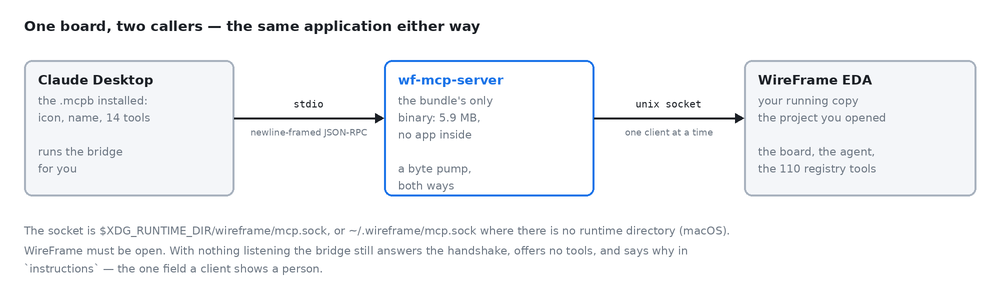
The bridge your agent starts talks to WireFrame over a local socket in your own user folder; there is no network port anywhere. A tool reads the project from your disk and answers your agent, and what your agent then does with the answer is between you and your agent's provider. For MCP itself, WireFrame sends your account two things, so the calls can be billed: how many were used, and the name of the agent that used them. Never what the calls were about.
Next#
- Connect Claude, Codex, Cursor or another agent
- MCP tool reference — the 33 tools and their parameters
- What waits for your approval
- Copilot commands — what
run_commandcan run - AI credit & your data — what
ask_penaltyspends